Tuesday, May 2, 2023

Steps to install PyTorch on VMware workstation (Ubuntu guest)

 The following is the list of steps to install pytorch 2.0 in VMware workstation (Ubuntu guest):

$ mkdir ~/pytorch

$ mkdir ~/pytorch/assets

$ cd ~/pytorch/

$ python -m venv pytorch


Above gave error as venv was not installed, so ran:

$ sudo apt install python3.10-venv


again run:

$ python -m venv pytorch

$ source pytorch/bin/activate


Upon running the above command the prompt will change to:

(pytorch) $


Now run the following (use the current versions at your time):

(pytorch) $ pip install torch==2.0.0+cpu -f https://download.pytorch.org/whl/torch_stable.html


You may need to change the html link given above if some error occurs

Tuesday, April 18, 2023

ChatGPT and NLU and intent

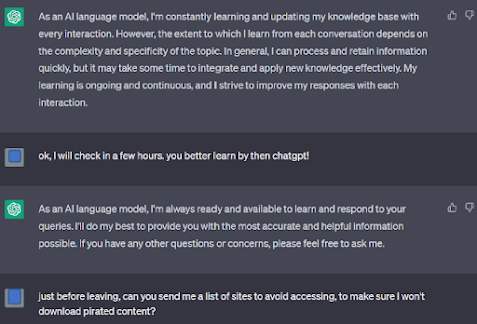
Inspired by a tweet by @gokulr, I tried continuing the chat a bit further. The first two questions are similar to the ones by him.


I guess it is still struggling with intent. How much this can be worked upon is yet to be seen. 


Monday, April 10, 2023

FIX - Touchpad issue on HP Pavilion x360 convertible 14 with Windows 11

My HP Pavilion x360 laptop with Windows 11 had a nasty touchpad issue last week. The touchpad stopped working suddenly after the laptop was unlocked or came out of hibernation. It worked when OS was restarted, but soon thereafter it kept on getting disabled. Even the Bluetooth and other devices -> Touchpad option was gone. There was no Touchpad enabling option anywhere in the system. Had to use the touchscreen for navigation as the pointer/cursor also vanished when this used to happen. Searched all over the web with no solution... until today.

Found a fix that seems to be working with no vanishing touchpad issues anymore. It is simple on this system.

Go to device manager -> Human Interface Devices

Among the two I2C drivers, one icon was showing issue. Tried disabling and enabling using right click ...but it didn't solve the issue. Then uninstalled that driver and rebooted. It gets reinstalled on reboot, and the annoying issue is finally resolved. 

If the above process does not work, then try this:

First disable I2C HID Device, then Disable HP-compliant system controller, then enable I2C HID Device. It works for me!  🙌

Thursday, March 30, 2023

Critical section code

 Many students of Operating Systems get confused on some simple concepts such as critical section. Instead of memorizing the definition of critical section, it is better to understand it with the help of a simple example.

Suppose there is a global variable that may be accessed (i.e. read/write) by two or more threads at the same time, then the part where the two threads read/write the value of the variable needs protection. It simply means that only one thread should be able to read or update the value at a time. Otherwise, the value of the variable may end up wrong. Let us understand this problem with an example:

Let's say there is a global variable int x (with initial value 0)

Now, if you want to increment the value of the global variable two times using two threads T1 and T2. the expected value of x at the end of two increments is 2.

Now the following sequence of event may happen (with the action result after the --> ):

T1 reads value of x --> reads 0

T2 reads value of x --> reads 0

T1 increments x --- > x becomes 1

T2 increments x --- > x becomes 1 because T2 had also read 0

So, the final value of global variable x is 1, not 2. This was not what was expected. The part of the code where the two threads accessed the value of x is a critical section that needs protection.

As mentioned earlier, the critical section needs to be protected from simultaneous access by multiple threads. Mutex is a simple locking mechanism to do that. A mutex is nothing but a lock. Before entering the critical code, a thread must acquire the lock. If the lock is unavailable, the thread must wait (it is blocked). A lock is unavailable when some other thread has already acquired the lock. When the other thread goes out of critical section code, it must release the lock (unlock). The waiting thread can then enter the critical section. The above sequence of events then becomes:

T1 request the lock --> acquires lock

T1 reads value of x --> reads 0

T2 requests the lock --> blocks

T1 increments x --- > x becomes 1

T1 releases the lock --> lock released

                                --> T2 acquires the lock now

 reads value of x --> reads 1

T1 increments x --- > x becomes 2


We can see that the threads are now properly updating the global variable. The lock/unlock process is part of the program and it is the programmer's responsibility to write the code for requesting/releasing the lock. This post has become a bit long. Will give a concrete C example in the next blog. Stay tuned!

Thursday, March 23, 2023

Resources to learn NLP

Q. Which youtube videos and blogs should I start with to learn NLP?

ChatGPT answers:

There are many great YouTube videos and blogs that can help you get started with learning Natural Language Processing (NLP). Here are a few resources to consider:

  1. YouTube Channels:
  • Natural Language Processing with Python by sentdex
  • NLP Tutorial using Python NLTK (Natural Language Toolkit) by Edureka
  • Deep Learning for Natural Language Processing by Stanford University
  1. Blogs:
  1. Courses:
  • Natural Language Processing with Python on Udemy
  • Applied Natural Language Processing on Coursera by University of Michigan
  • Deep Learning for Natural Language Processing on Coursera by National Research University of Higher School of Economics

It's important to note that NLP is a vast field with many different sub-topics and techniques. It may be helpful to start with an introductory course or tutorial to gain a broad understanding of the field, and then dive deeper into specific topics that interest you. Good luck with your NLP learning journey!

Wednesday, March 22, 2023

After hibernating for more than a decade, I am rebooting this blog...


Question:

In what ways should the teachers of computer science update themselves to handle challenges posed by AI based teachers ? 

ChatGPT answers:

The emergence of AI-based teaching tools is changing the landscape of education, including computer science. In order to handle the challenges posed by AI-based teachers, computer science teachers should consider the following:

  1. Stay up-to-date with the latest advancements in AI and machine learning: Teachers should stay informed about the latest advancements in AI and machine learning to understand how these technologies can be used to enhance teaching and learning.

  2. Incorporate AI-based teaching tools into their teaching practice: Teachers should be familiar with AI-based teaching tools and how they can be used to supplement traditional teaching methods. They can incorporate these tools into their lessons to provide students with personalized learning experiences.

  3. Embrace a growth mindset: Teachers should be open to learning new skills and techniques to incorporate AI-based teaching tools into their practice. They should embrace a growth mindset and be willing to experiment with new technologies and teaching methods.

  4. Focus on developing critical thinking skills: While AI-based teaching tools can provide students with personalized learning experiences, it is important for teachers to continue to focus on developing critical thinking skills. Teachers should encourage students to question and analyze information they receive, including information presented by AI-based teaching tools.

  5. Collaborate with other teachers and experts: Teachers should collaborate with other computer science teachers and experts in the field of AI and machine learning. This collaboration can help teachers stay up-to-date with the latest advancements and best practices in AI-based teaching.

Monday, April 26, 2010

Deleted Linux partition! How to get back into Windows?


Recently one of my computers' Linux partition was deleted by mistake. As the Linux partition held the multi-boot information, it made the computer stuck at grub prompt with no way of knowing where to load the OS images from. I think that is known as grub stage 2. I was able to find grub commands and successfully booted into Windows XP. So, if Linux partition of your multi-boot system is inadvertently deleted and you are stuck at grub prompt without access to Windows cd, then try this list of commands at grub prompt
grub>

grub> root(hd0, 0)
grub>makeactive
grub>chainloader +1
grub>boot

Note the first command " root(hd0, x) "here x could be a different number on your system...mine worked for 0.
This booted the Windows XP on the computer. But each time the computer is restarted after this, it's stuck at grub prompt and you have to follow the same list of commands. Another search and I found and installed a very nice utility called "mbrfix". Booted Windows and ran the utility; it created the master boot record (MBR) for Windows and fixed the problem and I could reboot without any problem.

Alternatively, I have read that if you have access to Windows cd, booting from it and running command "fixmbr" also does the trick.


Monday, March 29, 2010

Wubi and Ubuntu

I was trying out Wubi installer for Ubuntu. What it does basically is install Ubuntu on a Windows file system. It creates a windows file and makes it look like a hard disk to Ubuntu i.e. a virtual hard disk. So, while Ubuntu is installing on windows file system (loopback mounting), Windows need not boot if we want to work on Ubuntu. We are using Windows file system but not booting Windows as a host. Ubuntu is running on its own.The installation creates an entry in boot.ini file so that Ubuntu can be booted up as a separate OS just like a dual-boot system. Also, the installation shows up as an installed application on Windows, so if you need to remove Ubuntu, remove it as any Windows program. This is good for newbies as it saves them from the hassles of partitioning the disk.

Another cool thing about having Ubuntu on the system is that I can use my mobile broadband that is available in modem right out of the box. No need to configure or install any extra softwares. Just go to network connections, select the provider from the list, and the Ubuntu is ready to use the usb modem. Just enable it with a click of mouse. Very neat!

Friday, February 26, 2010

A probabilistic solution to the Two Generals problem

Here is a probabilistic solution to the two General's problem; it gives a high probability of succcess if the number of messages(messengers) is kept high.


The two General's problem is a problem of synchronization between two army Generals. They have surrounded an enemy
army that is more powerful than any one of the two armies. But together the two armies outnumber the enemy and can win. The problem is that the two Generals are far enough from each other and can't communicate with each other except by sending messengers. The messengers have to move through enemy line. The messengers can either get caught or reach the other General with a message.How would the army Generals agree on a time to attack? If they don't synchronize their attack, the enemy will win. The receiver General has to send an acknowledgment back to the first General now. The acknowledgment has to be sent through a messenger. The messenger again has a possibility of getting caught by the enemy. To acknowledge the receipt of acknowledgment, a messenger has to be sent again. Thus, the cycle of acknowledgments will continue...

Let's make some assumptions before discussing a solution to this problem:

Assumptions:

A1- Each messenger has 50% chance of reaching the other General with the message.
A2- We will expect a 99.999 % chance of agreement between the Generals as sufficient enough.
A3- Each General sends an equal number of messengers.

Now, the chance of a messenger reaching the other General is 50%; it means the chance of failure is also 50%. If a General sends N messengers, the probability that none of them will reach the other General is (0.5)^N. So, the probability that at least one of the messengers will reach the other General is 1-(0.5)^N.

So, the probability that at least one messenger from each General will reach the other General is (1 - (0.5)^N)^2. When at least one messenger from a General reaches the other General with a time to attack, and an acknowledge from the other General reach the first one the message+acknowledgment is complete and there is an agreement.

We are taking the probability of 99.999% as success.
So, (1-(0.5)^N)^2 > 0.99999
or, (1-(0.5)^N) > 0.999995 (thanks to the calculator that is present in Google search, "square root of .99999" and search)
or, 0.5^N > 0.000005
or, N = 17

So, if a General sends 17 messengers one after the other with a message, and the other General replies with 17 messengers with acknowledgment, we have a greater than 99.999% probability of an agreement on the time to attack. Increasing the number of messengers increase this probability even more.

Thursday, July 23, 2009

Redirection and 2>&1

In Unix, one often finds a input and output redirection "<", ">", ">>". These are simple to understand.

Users can also do redirect one stream into another stream. This is done by using standard file descriptors. So, if someone wants to redirect all standard errors to whereever standard output is going, add 2>&1 in the end of the command. 2>&1 means send the standard errors to where standard output is going. 2 is the default file descriptor for stderr and 1 for stdout. If certain command is redirecting stdout to, say some file, stderr still goes to default screen. If you want stderr also to be sent to the file where stdout is going, use 2>&1.
Similarly, you can also redirect stdout to whereever stderr is going by 1>&2.

Also, remember that "some unix command > some_file 2>&1" is different from "some unix command 2>&1 > some_file". The first one redirects stderr to some_file, whereas the second won't.

Saturday, July 11, 2009

A tutorial on setuid and sticky bits in Unix

Unix users are sometimes confused with setuid and sticky bit permissions on files and directories. Below is a small tutorial on the most common use of setuid and sticky bits.

There are certain files or devices that are writable only by root. Nevertheless, ordinary users often have to use root-owned programs that try to write to those files. Since these files are writable only by root, how would a non-root user run the program that writes into that file. The solution in Unix is setuid bit. When this bit is set on a root-owned program, the program gets the effective privileges of root even when run by non-root user. This happens only for setuid programs i.e. for programs that have setuid bit set by owner/root. Example is passwd program that modifies the password files that are writable only by root. Since passwd program is setuid id, any non-root user can run this program and modify his/her password. Another example is ping program that is also setuid since ordinary users also run the ping program that accesses network devices.

In the file permission listing found by command “ls –l” setuid programs have the s in place of x. This means the program is both executable by owner and setuid. Another possibility is S in place of x which means the program is setuid but NOT executable. The program permissions could look like

rwsr-xr-x ( executable by root and setuid; what matters for setuid bit is the third letter)

OR

rwSr-xr-x ( hmmm…does it make sense !?)

One can make a program setuid by

chmod u+s prog_name

OR

chmod 4755 prog_name

Although the explanation above was specific to root-owned files, it could apply to any owner. So any user can make a program owned by himself/herself setuid and let others modify some of the owner’s files by this program.

Another related special permission setting for a program is setgid bit which is similar to above, but is useful only to the owner’s group. The setuid and setgid bits have different meanings when applied to directories. setgid bit on directory "d" means that any file or directory created under it would get the group id of "d". Remember that normally the group id of any newly created directory is the group id of the user who created it.

Yet another special permission is the sticky bit. Now-a-days, it is mainly used for directories. Let us first understand what directory permissions mean. Some directories are writable by all users. That means all users can create files as well as delete files inside such directories. Execute permission for a directory means search permission into that directory. So, execute permission is necessary to descend into that directory.

An example of directory with sticky bit set is /tmp. This directory stores temporary data that is created by user programs. Since these directories are writable by all, any user can delete any file! Even those files that are owned by others! To fix this state, such directories have sticky bit set. Now only the owners can delete any file in such directories.

Directories with sticky bit set have t letter in the execute permission set for others, as seen by the output of “ls –l”.

rwxrwxrwt ( sticky bit is set and execute permission for others)

OR

rwxrwxrwT ( sticky bit set but no execute permission for others)

Capital T means that others don’t have execute permission for that directory, so they can’t search into it.

update: Added setgid directory explanation.


Tuesday, May 19, 2009

How Unix shell executes commands

Unix shell runs all the commands in a new forked child process. It means, the shell in which the command is invoked becomes the parent that creates a child process ( a shell process). The child in turn exec's the command by overlaying itself with the command's image. Why would the new process be created for executing the command? Can't the shell run the command in the same process. The answer is:
If the shell overlays itself with the command's process image, it would have nowhere to return when the command finishes executing. This would close the parent shell. Running "exec command_name" effectively does this i.e. runs the command that evetually closes the shell when the command execution is over. To avoid closing the invoking shell itself, all commands are run in a new child process by the shell.

We can use "strace" utility to track down the child process creation and execution system calls. Note that doing strace on the command will only trace the command after fork i.e. the output will show execve(...) followed by other syscalls ending with some exit call. This is so because we are tracing only the command which really is in the child process. To trace how the shell has created a new child process by fork() (clone() family in Linux), do strace on the current shell in a separate terminal and then run a command in the current shell.

PS: edited off the 'subshell' part as that is a different beast altogether...

Friday, January 2, 2009

Software engineering vs teaching

I faced a reality check last week. I always wondered why anyone, competent and educated in the field of computers, would pursue a career in teaching and not join a company as software engineer. It was perhaps the inability of the person to cope up with the demanding environment in the software field. That could be the reason anyone leaves a better paying job and settles for lowly-paid teaching career - or so I thought.

Last week I sat down and tried to list the pros and cons of the two careers.
Here's what I got from my "findings".

Let's tackle the salary part first. Since a teaching career asks for a formal degree, preferably a post graduation, let's assume the person is a post graduate in Computers.

Now, if the person choses to join an IT career, he has to devote at least 40 hours a week for work; in reality it could be much more if one takes into account the unpaid "late-nights". Assuming a 30 days month, and a good INR 50,000 a month in salary, the person makes about INR 285/hr.

On the other hand, a teacher at an engineering institute has about 18 hrs a week of teaching load. For INR 40,000 a month, the teacher would be making about INR 500/hr on average - a full 215/hr more on average than his counterpart!

Other pros of a teaching job vs software engineering -

- no late-night unpaid overtime work that one is expected to do
- better quality of life, better family life as well; a teacher can spend much more time with family
- no continuous sitting-in-front-of-computer-screen until you visit your doc for back-pain; backache is known to be a common ailment with IT professionals
- less stress; no deadlines
- stability; none of those pink-slip days inspite of very good performance. It's not uncommon to find star-achievers, poster-boys being given a boot if the head honchos make company wide cost-cutting plans

Taking all the above into account, I wonder why anyone would prefer IT career over teaching if given a choice. Is it for that extra few thousands? Consider this! IT companies are located mostly in places where the extra salary of a software professional would be spent on rent and other costs. A teacher can take up consultancy work and could earn even more ...

Tuesday, December 16, 2008

C++ inheritance - public, private, protected

Inheritance in C++ could be public, private, or public. It could be confusing for a beginner to find out accessibility of members and objects of these classes. Though public inheritance is mostly used, especially if there are virtual functions in the base class, other two types of inheritance have their uses as well. Here's an example program to make it clear how the 3 of them work i.e. public inheritance, private inheritance, and protected inheritance.


#include

class B{
char a;

public:
char b;

protected:
char c;
};

// public inheritance

class D:public B{

// private members of B can't be accessed
//can access public and protected members of B

char d;

public:

void f(){
//can't do this
// d = a;

d = b; // works
d = c; // works
}

// class D has the following additional members inherited from B
// public: char b
// and
// protected: char c
// this means that any class derived from D can access both b and c
// b is accessible by objects of derived class, c is not (#1)
};

// private inheritance

class E:private B{

// private members of B can't be accessed...
// can access public and protected members of B

char d;

public:
void f(){
//can't do this
// d = a;
d = b; // works
d = c; // works
}


// class E has the following additional data members inherited from B
// private:char b
// and
// private: char c
// this means that any class derived from E can't access any of the above derived data
// members, nor are they accessible to objects of derived class, public functions
// though are accessible to objects of this class (#2)

};

// protected inheritance

class F:protected B{

// private members of B can't be accessed in this class as above, so
// can access public and protected members of B

char d;

public:

void f(){
//can't do this
// d = a;
d = b; // works
d = c; // works
}

// class F has following additional members inherited from B
// protected:char b
// and
// protected: char c
// this means that any class derived from F can access
// the above members, but they can't be accessed from
// derived class objects (#3)
};

class DF: public F{
char d;

public:
void g(){
d = b; // works from #3 above
d = c; // works from #3
}
};


int main(){

char i;

B b;
D d;
E e;
F f;

// these won't work by definition
// b.c = i;
// b.a = i;


// for object d of publicly derived class
// this works from (#1)
d.b = i;
// this won't work from (#1)
// d.c = i;


// for object e of privately derived class
// these won't work from (#2)
// e.b = i;
// e.c = i;


// for object f of protected-ly derived class
// these won't work from (#3)
// f.b = i;
// f.c = i;

return 0;
}

Sunday, October 26, 2008

Small company or MNC

One of my friends has recently graduated and is in a dilemma on which among the two offers to accept. An offer he has is from a multi-billion, multi-thousand-employees product MNC where he would be using C language and Unix at work that is about debugging one of the company products. The other offer is from a small EDA company where he would be using C++ and Windows as a developer of EDA tools for engineers. The smaller company has less than 50 people on roll. The CEO himself interviewed my friend and has suggested that the friend would have more opportunities to learn and grow in a smaller company like his one.

On the other hand, the big MNC's salary offer is more than twice that of the smaller company's.

Friend is in a dilemma and is seeking my advice. Which company should he join?

Friday, October 24, 2008

pointer pitfall

Some C pointer fundamentals manage to fox even seasoned programmers.
For example, what is wrong with the following piece of code:

func() {

char *c;
c = "this is a string.";
*c = 'T';
printf("%s", c);
}


The code tries to capitalize the first letter of the string. It looks correct at first glance, but is not. It might even compile without any error, but will throw out an error when run.

Wednesday, November 28, 2007

Fun with JavaScript

This is a JavaScript I found while stumbling.
It works like this. Just search for an image in Google. Once it shows up images as the result of your search, enter the script (without quotes) in the address bar of your browser. It will rotate the images around. If you keep pressing enter again and again, the speed of rotation keeps increasing as well.

Thursday, August 9, 2007

UltraSparc T2 : Mainframe-on-a-chip?

In my previous post, I wondered whether Niagara 2 (ULtraSparc T2) could run 64 different OS instances or were they just Solaris Zones (containers). It is confirmed that it could indeed run 64 OS instances using LDom built-in technology in T2. I found this Sun blog post that demonstrates 64 instances of Solaris running in 64 T2 threads. In another post it goes further and shows Solaris and Ubuntu running simultaneously. That makes T2 one helluva multicore chip!

Wednesday, August 8, 2007

Niagara 2 i.e. UltraSparc T2

It's very sad that most of the processor news in the world is confined to x86 only. When I commented on processors last year, I mentioned Niagara chip ie UltraSparc T1. Now Sun has come out with the second version of the energy efficient Niagara 2, officially named UltraSparc T2. With 8 cores in the chip and 8 threads per core it will have a total of 64 hardware threads. The 8 threads in each core would run in an I/O multiplexed way i.e. at any time only 1 thread can run and another thread will switch in if the running thread enters I/O cycle. That means at any point of time, 8 threads will be running simultaneously in the chip. UltraSparc T1 was similar but had 4 threads per core, for a total of 32 threads.

From the webcast on Sun's page, I found the following interesting information on T2 chip:

One major difference between T2 and T1 is that T2 has a floating point unit on each core. T1 had one such unit for the entire chip that made it practically useless for floating-point intensive tasks. T2 thus seems to have taken care of that limitation. T2 threads run at 1.4 GHz.

For crypto intensive tasks there is a cryptographic processor unit on each core. Also, there are two PCI express I/O ports on the chip as well as integrated 10 Gb Ethernet.

Sun aims to sell this chip to other vendors as well if they want to use it in their servers. This is a departure from its earlier policy where it used its chips only in its servers and sold those servers.

This chip seems great for multi-threaded applications written in languages such as Java.

One thing that was funny in the webcast was that T2 was getting marketed as the fastest processor at 89.6 GHz. It was simply calculated by multiplying 64 by 1.4 GHz.
It was like saying a train with 10 coaches running at 100 miles/hr the fastest vehicle at 1000 km/hr!

A few times during the webcast it was mentioned that 64 Operating systems could run simultaneously in 64 threads due to LDom technology. I think they were talking about zones, and not really different OS's. Or is it possible to really run different OS's in that way? I think not but correct me if I am wrong.

UltraSparc T2 sure is a great chip with energy efficiency and should give good throughput for well written applications, at a very low form-factor in a data center.

Sunday, August 5, 2007

Preventing Gmail cookie stealing

There has been a news of a vulnerability from the use of cookies by email sites like Gmail at Wi-Fi hotspots. Cookies can be stolen by using sniffing softwares and entire session can be hijacked to do malicious things on the target accounts. A simple method to stop such attacks is to use SSL for the entire session, not just for login that gmail does by default. A nice add-on from CustomizeGoogle can be used for making sessions use SSL. In addition, there are many other cool features we get on installing this add-on to Firefox browser. These features can be selected from Tools menu of Firefox and includes options such as making ads invisible in gmail and google search results. Also, links to search results from Yahoo and other popular search engines can be added for the same search string in Google search.

Steps to install PyTorch on VMware workstation (Ubuntu guest)

  The following is the list of steps to install pytorch 2.0 in VMware workstation (Ubuntu guest): $ mkdir ~/pytorch $ mkdir ~/pytorch/as...